AVIF vs JPG: which to use, measured on the same photo
AVIF makes smaller files than JPG at the same quality and is slower to make. JPG opens everywhere. Which one to use comes down to where the image is going, and the numbers below, all measured on one photograph with the same code CropShrink runs, show how big each of those differences really is.
The short answer: use AVIF for images on web pages you control, where it saves a quarter to a third of the bytes and every current browser shows it. Use JPG for anything that leaves the browser — email, print, documents, upload forms, sending a photo to someone — because JPG is the one format every program on every device can open.
Size, at the same quality
Comparing sizes at the same quality setting is misleading, because a JPEG’s quality 80 and an AVIF’s quality 80 are different scales. So we matched them by what they look like instead. Our sample photograph — a 1920 × 1280 lakeside landscape — was saved as JPEG at five settings. For each, we found the AVIF with the same structural similarity (SSIM) to the source, a standard measure of how closely an image matches its original:
| JPEG quality | JPEG | AVIF at the same SSIM | AVIF is |
|---|---|---|---|
| 50 | 274 KB | 197 KB | 28% smaller |
| 60 | 301 KB | 221 KB | 27% smaller |
| 70 | 338 KB | 230 KB | 32% smaller |
| 80 | 538 KB | 406 KB | 25% smaller |
| 90 | 655 KB | 591 KB | 10% smaller |
At the settings people actually publish at, AVIF saves 25–32%. On our sample screenshot, where hard edges and flat colour play to AVIF’s strengths, the saving was 36–41% at every setting. The advantage shrinks at the top of the range: at JPEG quality 90 it is down to 10%, and a quality 95 JPEG was more faithful than any AVIF we measured. For near-archival quality, AVIF buys you little.
What the difference looks like
A size table says nothing about how a file fails. Here the whole photograph was squeezed to the same file size, about 120 KB, as JPEG and as AVIF (and WebP, for reference), and the same patch of hillside is shown from each:
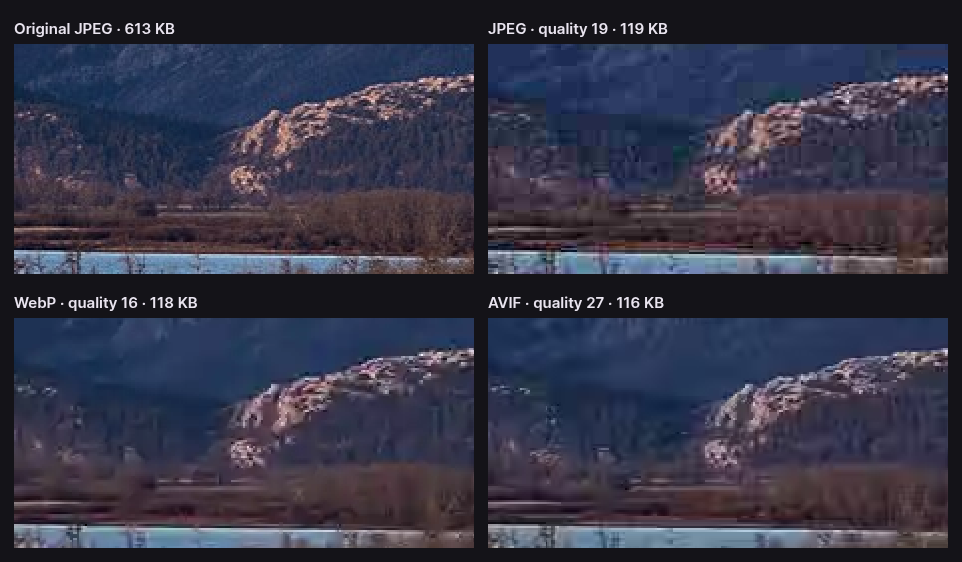
JPEG divides the picture into 8 × 8 squares and compresses each on its own, so when bytes run short the squares show. AVIF, built on the AV1 video codec, uses blocks of many sizes and filters their edges, so it fails by going soft rather than blocky. That is why the gap widens as files get smaller: at generous sizes both look fine, at tight ones only AVIF still looks like a photograph.
Speed: slow to make, slightly slower to show
Here the trade runs the other way. We timed both formats on the same photo at the editor’s default quality of 80, in Chrome, taking the median of several runs:
| Format | File size | Encode | Decode |
|---|---|---|---|
| JPEG | 538 KB | 40 ms | 18 ms |
| AVIF | 349 KB | 1,534 ms | 47 ms |
Encoding AVIF took about 40 times as long. That cost is paid once, by whoever makes the file, and on a web page it is a non-issue: the image is encoded once and viewed thousands of times. It matters when you are converting large batches, or generating images on the fly.
Decoding is what every visitor pays, and there AVIF is slower by about 30 milliseconds for this photo. But its file is 190 KB smaller, and on a 10 Mbit/s mobile connection 190 KB takes about 150 milliseconds to download. The smaller download wins by a wide margin on a phone; on a fast fibre line the two roughly cancel out.
One more difference in how they arrive: a JPEG saved as progressive can show a blurry full preview while it downloads, then sharpen. An ordinary AVIF appears only once it has fully arrived.
What each format can do
| JPG | AVIF | |
|---|---|---|
| Published | 1992 | 2019, by the Alliance for Open Media |
| Compression | Lossy only | Lossy or lossless |
| Transparency | No | Yes, a full alpha channel |
| Colour depth | 8 bits per channel in practice | 8, 10 or 12 bits per channel |
| HDR and wide colour | No | Yes |
| Animation | No | Yes, as image sequences |
| Progressive display | Yes, if saved that way | Not for ordinary files |
| Camera metadata (EXIF) | Yes | Yes |
| Web browsers | All of them | All current ones: Chrome 85+, Firefox 93+, Safari 16+, Edge 121+ |
| Everything else | Universal | Patchy: many viewers, editors, office suites and services refuse it |
The format’s capabilities are wider than any one tool uses. CropShrink exports 8-bit, lossy AVIF with half-resolution colour, which is what the web needs, and keeps transparency exactly; it does not write HDR, lossless or animated AVIF.
When to prefer which
Choose AVIF for:
- Images on your own website or app. A quarter to a third fewer bytes on every photo, for every visitor, forever.
- Tight size budgets. Where a JPEG would break into blocks, AVIF stays presentable, as the comparison above shows.
- Web images with transparency. JPG has none; AVIF is much smaller than the PNG you would otherwise use.
- Screenshots and graphics for the web, where its advantage over JPEG was largest, at around 40%.
Choose JPG for:
- Anything you send or hand over: email attachments, messages, files for a client, print shops.
- Upload forms, which very often accept only JPG and PNG, and job, visa and government portals in particular.
- Documents and presentations, where office software support for AVIF is still inconsistent.
- Very high quality copies. At JPEG quality 90 and above, AVIF saves little, and JPG costs no compatibility.
- Large batches on slow hardware, where 40 times the encoding time adds up.
You rarely have to choose only one
On a website, the usual answer is both. A <picture> element lists an AVIF <source> and falls back to a JPG <img>; each browser downloads only the first format it understands, so current browsers get the smaller file and older ones still get a picture.
And whatever you publish, keep the original. Converting a JPG to AVIF compresses it a second time, and converting it back compounds the loss. Make each published copy from the best original you have.
How we measured
Every number here comes from Chrome running the same encoders CropShrink uses: the browser’s own JPEG encoder, and libavif 1.0.1 compiled to WebAssembly at speed 7. The source is a 1920 × 1280 photograph of Waterton Lakes National Park, a United States National Park Service image in the public domain, and the screenshot is a 1600 × 922 capture of this editor. Similarity is luma SSIM over 8 × 8 blocks; timings are medians on a four-core test machine and will differ on yours, though the proportions hold.
The scripts are in the repository: scripts/measure-avif.mjs for the equal-quality sizes, scripts/measure-speed.mjs for the timings and scripts/build-resampling-crops.mjs for the comparison. To see it on your own photo, open JPG to AVIF and drag the comparison divider. The AVIF vs WebP and AVIF vs PNG guides put the same measurements against the other two formats.
Questions about AVIF and JPG
Is AVIF better quality than JPG?
At the same file size, yes, clearly; at the same quality, AVIF is the smaller file. On our sample photo it was 25–32% smaller than JPEG at the settings most people use. At very high quality the difference nearly disappears.
Should I convert all my JPGs to AVIF?
Only the ones you publish on the web. Keep the JPGs as your originals, and keep using JPG for anything you send to people or upload to forms. Converting adds a second round of compression, so convert once, from the best copy you have.
Why isn’t AVIF used everywhere yet?
Browsers support it, but much other software does not yet, and encoding is far slower than JPEG. JPG has a nearly thirty-year head start: every camera, phone, printer and program already reads it.
Put it to work
- JPG to AVIFConvert a photo on your device, and compare with the divider.
- PNG to AVIFWhere AVIF saves the most: screenshots and graphics.
- WebP to AVIFAlready WebP? What another step down is worth.
- AVIF vs WebPThe same measurements, against WebP.
- Compress an imageKeep it as JPG and trade quality for bytes instead.