AVIF vs PNG: which to use, measured on screenshots, photos and logos
PNG and AVIF are not really competitors. PNG keeps every pixel exactly and opens everywhere; lossy AVIF gives up exactness for files a tenth the size or smaller. The question is which of those an image needs, and the measurements below show how large the trade is on four kinds of image.
The short answer: for images on a web page — screenshots, photos, logos and icons, transparent or not — AVIF was 64–94% smaller in our tests and keeps transparency exactly. Keep PNG for your master copies, for anything that must stay pixel-exact, and for anything that leaves the browser.
Screenshots and photos
We converted two images through the editor: our 1600 × 922 screenshot of the CropShrink interface, a 1,429 KB PNG, and our 1920 × 1280 sample landscape saved as PNG. AVIF quality is the editor’s slider, which is calibrated to look like WebP at the same number.
| Image | PNG | AVIF 80 | AVIF 90 |
|---|---|---|---|
| Screenshot | 1,429 KB | 131 KB | 213 KB |
| Photo | 4,420 KB | 349 KB | 494 KB |
At quality 90 the screenshot is 85% smaller and the photo 88% smaller. PNG’s compression looks for exact repeats — runs of identical pixels, rows that match the one above — so it does well on flat interface backgrounds and badly on anything with texture or noise. A photograph has almost no exact repeats, which is why a photo saved as PNG is typically many times the size of the same photo in any lossy format.
The price of those savings is exactness. Lossy AVIF stores colour at half resolution, so where white text sits on a saturated background, a faint tint of the background creeps into the letters:
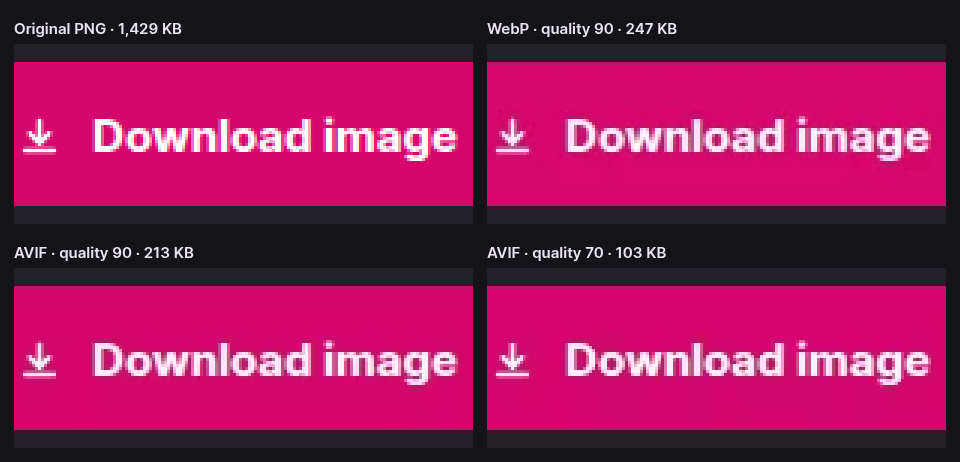
At normal viewing size nobody sees it. Under a magnifier, or in a tool that measures pixels, it is there, and that is the line between the two formats.
Logos and icons with transparency
Transparency is the reason many images are PNG in the first place, and AVIF has it too. To test it we drew two 800 × 480 logos on a transparent background: a flat one in two solid colours with hard edges, the kind PNG handles best, and an app icon with a colour gradient, a highlight and a soft drop shadow.
| Logo | PNG | AVIF 80 | AVIF 90 | Transparency |
|---|---|---|---|---|
| Flat colour | 13.4 KB | 4.6 KB | 4.8 KB | Exact |
| App icon | 189.9 KB | 11.0 KB | 12.0 KB | Exact |
Even the flat logo, already small as PNG, came out at about a third of the size; the icon, whose gradient and shadow are exactly what PNG struggles with, at about a seventeenth. In both, every alpha value — the anti-aliased outline, the fade of the shadow — came back identical to the original, because CropShrink stores AVIF’s transparency losslessly. We checked by decoding each AVIF and comparing its alpha channel to the source, pixel by pixel.
The colours inside the logo are compressed like any other lossy image, so a logo with fine coloured detail can show the same slight tint as the text above. For a logo on a web page, that is invisible; for the master file your designer hands over, keep the PNG.
If it has to be lossless
AVIF also has a lossless mode, and so does WebP. CropShrink exports lossless WebP at quality 100, but not lossless AVIF, so we measured that straight from the same libavif build. All three are exact; we confirmed every file decodes to identical pixels.
| Image | PNG | Lossless WebP | Lossless AVIF |
|---|---|---|---|
| Screenshot | 1,429 KB | 1,040 KB | 1,546 KB |
| Photo | 4,420 KB | 2,438 KB | 4,205 KB |
| Flat colour logo | 13.4 KB | 22.3 KB | 6.9 KB |
| App icon | 189.9 KB | 105.6 KB | 90.9 KB |
There is no single winner. On the real screenshot and photo, lossless WebP is the smallest and lossless AVIF barely beats PNG, or loses to it. On the two drawn logos, lossless AVIF is the smallest, and on the flat one Chrome’s lossless WebP encoder, the one CropShrink uses, made a file larger than the PNG. Sizes like these depend on the encoder and its settings as much as on the format, and PNG optimisers can shrink a PNG further without changing a pixel.
In practice: if an image must stay exact, PNG is the safe choice everywhere, and for a screenshot on a web page lossless WebP is usually smaller. Compare the sizes on your own image before assuming.
What each format can do
| PNG | AVIF | |
|---|---|---|
| Published | 1996, by the W3C | 2019, by the Alliance for Open Media |
| Compression | Lossless only | Lossy or lossless |
| Transparency | Yes, a full alpha channel | Yes, a full alpha channel |
| Colour depth | 1 to 16 bits per channel, or a palette of up to 256 colours | 8, 10 or 12 bits per channel |
| HDR | Since the 2025 third edition; little software writes it yet | Yes |
| Animation | Yes, as APNG | Yes, as image sequences |
| Re-saving | Never loses anything | Each lossy save loses a little more |
| Web browsers | All of them | All current ones: Chrome 85+, Firefox 93+, Safari 16+, Edge 121+ |
| Everything else | Universal: every editor, viewer, office suite and upload form | Patchy |
The last two rows are why PNG will not go away. AVIF encoding is also slow — about 1.5 seconds for our sample photo, as measured in the AVIF vs JPG guide — which only matters when converting in bulk.
CropShrink exports 8-bit lossy AVIF with half-resolution colour and exact transparency; it does not write lossless, HDR or animated AVIF.
When to prefer which
Choose AVIF for:
- Photos that were saved as PNG. There is no reason to publish one; AVIF cut ours by 92% at quality 80.
- Screenshots and diagrams on web pages, help articles and documentation sites, at quality 90 so text stays clean. Step-by-step guides are a typical case: a screenshot tool such as GrabCanvas exports each annotated step as a PNG, and every one of them is a candidate before the guide goes online.
- Logos, icons and product cut-outs on the web, where transparency comes through exactly and the file shrinks by nearly two-thirds or more.
Choose PNG for:
- Master copies and anything you will edit again. PNG can be re-saved forever without loss.
- Pixel-exact images: UI mock-ups a developer will measure, charts with one-pixel lines, pixel art, QR codes, screenshots attached to a bug report.
- Anything that leaves the browser: documents, slides, email, design tools and upload forms all take PNG; many do not take AVIF.
- Tiny, simple graphics, where the PNG is a few kilobytes already and the saving is not worth a second file.
How we measured
Every number here comes from Chrome running the encoders CropShrink uses: the browser’s own PNG and WebP encoders, and libavif 1.0.1 compiled to WebAssembly at speed 7. The photograph is a public-domain image of Waterton Lakes National Park from the US National Park Service; the screenshot is our own; the two logos are drawn from simple shapes, with no text, so that fonts cannot change them. The photo and logo PNGs are as Chrome writes them; the screenshot is the PNG file itself.
The script is scripts/measure-to-avif.mjs in the repository; run it with logo-flat or logo-icon for the logos. The AVIF vs JPG and AVIF vs WebP guides use the same measurements against the other two formats.
Questions about AVIF and PNG
Is AVIF better than PNG?
For images on the web, usually: our screenshot was 85% smaller as AVIF at quality 90 and our photo 88% smaller, with transparency kept exactly. But lossy AVIF is not pixel-exact, and PNG opens in every program, so PNG remains the right format for masters and for anything outside the browser.
Does AVIF support transparency like PNG?
Yes, with a full alpha channel. CropShrink stores it losslessly, so outlines and soft shadows come back identical to the PNG’s; we checked every alpha value on two test logos.
Is AVIF lossless like PNG?
It can be, but CropShrink’s AVIF is always lossy. Lossless AVIF exists, and on our measurements it was sometimes the smallest lossless format and sometimes larger than the PNG. For exact pixels, keep the PNG, or try lossless WebP.