Compress an image to 50 KB
The editor above has its limit set to 50 KB. Open a photo and CropShrink tries quality settings until it finds the highest one whose file still fits. If none does at the photo’s current size, it tells you so instead of handing back something that will bounce off the form.
With a limit this tight, the width of the image decides more than the quality slider ever will. The rest of this page shows why, with measurements from the editor itself, and what to do about it.
50 KB is a budget for pixels
A size limit fixes how many bytes the whole picture may use. Every pixel you keep has to share them, so the more pixels there are, the fewer bytes each one gets — and quality is simply the name for bytes per pixel. We ran the editor’s own resize and size search on our sample photograph, a detailed lakeside landscape, at seven widths:
| Pixels | Megapixels | WebP quality | JPEG quality | Result |
|---|---|---|---|---|
| 400 × 267 | 0.11 | 97 | 95 | No visible loss |
| 600 × 400 | 0.24 | 85 | 82 | No visible loss |
| 800 × 533 | 0.43 | 65 | 57 | Clean, slightly soft |
| 1000 × 667 | 0.67 | 36 | 33 | Blocky in fine detail |
| 1200 × 800 | 0.96 | 20 | 21 | Smeared; not usable |
| 1600 × 1067 | 1.71 | 6 | 10 | Smeared; not usable |
| 1920 × 1280 | 2.46 | 1 | 7 | Smeared; not usable |
Every row fits under 50 KB — even the full 1920-pixel photo, at WebP quality 1. Fitting is not the problem. What the file looks like when it fits is. Here are four of those rows, each shown over the same stretch of shoreline and enlarged to the same size:
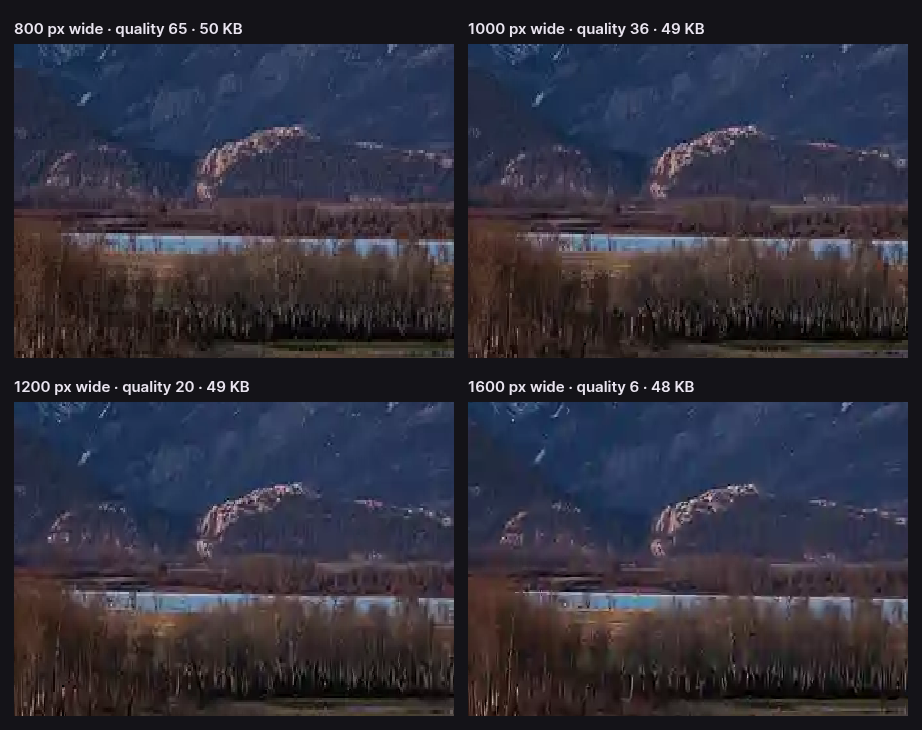
So for a photograph, resize to about 800 px wide before you aim at 50 KB. That is plenty for anything a form will display, and it leaves enough bytes for each pixel to look right. A simpler picture — a face against a plain wall, a document — compresses much further than this landscape, so it can keep more pixels; the table is close to the worst case for a real photo.
Getting a photo under 50 KB, step by step
- Crop first if the form wants a particular framing, such as a head-and-shoulders photo. Every pixel you crop away is budget returned to the rest.
- Resize. Switch on Resize and enter the width the form asks for, or 800 px if it does not say. Keep Maintain aspect ratio on.
- Choose the format the form accepts. Most accept JPEG; WebP gives a slightly higher quality at the same size where it is allowed.
- Check the quality it chose. The Compress panel shows the setting the search settled on. Above 60, you are fine. Below 30, go back to step 2 and make the image smaller.
PNG cannot be aimed at a size, because it is lossless: there is no quality to trade. The size control switches itself off when PNG is selected.
A 50 KB limit is not always 50 KB
Two definitions of a kilobyte are in use. CropShrink, like Windows and most file browsers, counts 1 KB as 1,024 bytes, so a file that fits a 50 KB target here may be up to 51,200 bytes. Some upload forms count 1 KB as 1,000 bytes and would reject anything over 50,000.
If a file the editor says is under 50 KB is refused, set the target to 48. That is 49,152 bytes, which passes either definition. The cost in quality is too small to see.
ID photos, signatures and scans
A 50 KB limit is typical of the forms that ask for a photograph of you or of your handwriting.
- Passport-style photos. These portals usually state exact pixel dimensions as well as the size limit — enter those in the Resize panel first, and the target is then easy to reach, because a face on a plain background carries far less detail than a landscape. If they give a shape but no pixels, crop to that ratio and resize to around 600 px on the long side.
- Signatures. Ink on white paper is mostly empty space and compresses to very little. What wastes the budget is a phone photo with shadows and paper texture around it: crop tight to the signature, and use JPEG.
- Scanned documents. Text needs its sharp edges more than a photo does, so keep the width that makes it readable and let the quality fall. Check the result at 100% zoom before you upload it.
Questions about 50 KB limits
How do I reduce a photo to 50 KB without it looking bad?
Make it smaller in pixels first. At 800 px wide a detailed photo fits 50 KB at quality 65 and looks clean; at its full 1920 px it only fits at quality 1 as WebP, or 7 as JPEG. Resize, then let the editor find the quality.
Why does the editor say my image cannot reach 50 KB?
Because even its lowest quality setting produces a larger file at the current dimensions. That happens with large photos, most often from phone cameras. Switch on Resize, reduce the width, and the search will run again.
Is 50 KB the same as 0.05 MB?
Nearly. 50 KB is 0.049 MB when both are counted in 1,024s, and 0.05 MB when both are counted in 1,000s. If a form is strict about it, set the target to 48 KB and the file passes either way.
Is my photo uploaded to compress it?
No. The resize, the size search and the encoding all run in your browser, and the file is saved from there. That matters for ID photos and signatures in particular; the privacy policy shows how to check it.
Other size limits
The same control takes any number — type the one the form gives you. For a looser limit, the 100 KB page has its own measurements; the pattern is the same, with twice the bytes to spend. A signature field’s tighter 20 KB has a page too.
More image tools
Every one of these is the same editor, opened for a different job — and all of them run on your device.
- Compress an imageShrink a photo for the web, an email or an upload form.
- Compress to 100 KBHit a hard upload limit without guessing at the quality slider.
- Resize an imageChange the pixel dimensions with Lanczos3, Catmull-Rom or Mitchell.
- Crop an imageTrim to what matters, freeform or to a fixed ratio.
- Remove EXIF dataStrip the GPS location, camera and serial number from a photo.
Or start from the full editor, which does all of it at once.