Convert JPG to AVIF
The editor above is set to export AVIF. Open a JPG and it is re-encoded on your own device with libavif, the reference AVIF encoder, and handed back as a file that is usually around half the size. Nothing is uploaded: the encoder comes to your browser, your photo never goes to it.
The first time you convert, the browser downloads the encoder from this site (about 840 KB) before it starts. After that it is cached, and each conversion takes a second or two.
What the conversion saved, measured
We converted our sample photograph — a 1920 × 1280 lakeside landscape, stored as a 613 KB JPEG — through the editor at five settings of the quality slider, and exported the same pixels as JPEG and WebP too for comparison:
| Quality | JPEG | WebP | AVIF | AVIF vs the original |
|---|---|---|---|---|
| 60 | 301 KB | 290 KB | 274 KB | 55% smaller |
| 70 | 338 KB | 326 KB | 287 KB | 53% smaller |
| 80 | 538 KB | 423 KB | 349 KB | 43% smaller |
| 90 | 655 KB | 649 KB | 494 KB | 19% smaller |
| 100 | 1,678 KB | 2,438 KB | 1,629 KB | 166% larger |
The WebP and AVIF columns are matched: each AVIF setting is calibrated to look like WebP at the same number, measured by structural similarity against the source, and AVIF is smaller in every row — 17% at the editor’s default of 80. The JPEG column is on JPEG’s own scale, which is not matched: at 80, JPEG keeps more detail than the other two on this photo. Matched properly, AVIF was 25% smaller than a quality 80 JPEG and 10% smaller than a quality 90 one; the AVIF vs JPG guide has the full comparison.
The last row is the trap. Do not convert at quality 100. A JPEG has already thrown detail away; asking for a near-perfect copy of what is left makes the encoder spend bytes faithfully preserving the JPEG’s own blocks and noise, and the AVIF ends up nearly three times the size of the file you started with. Anywhere from 70 to 85 is the useful range for photographs.
The same file size, three ways
Size tables say nothing about how a file looks. Here the whole 1920-pixel photo was squeezed to about 120 KB — a fifth of the original — in each format, using the editor’s own size search, and the same patch of hillside is shown from each:
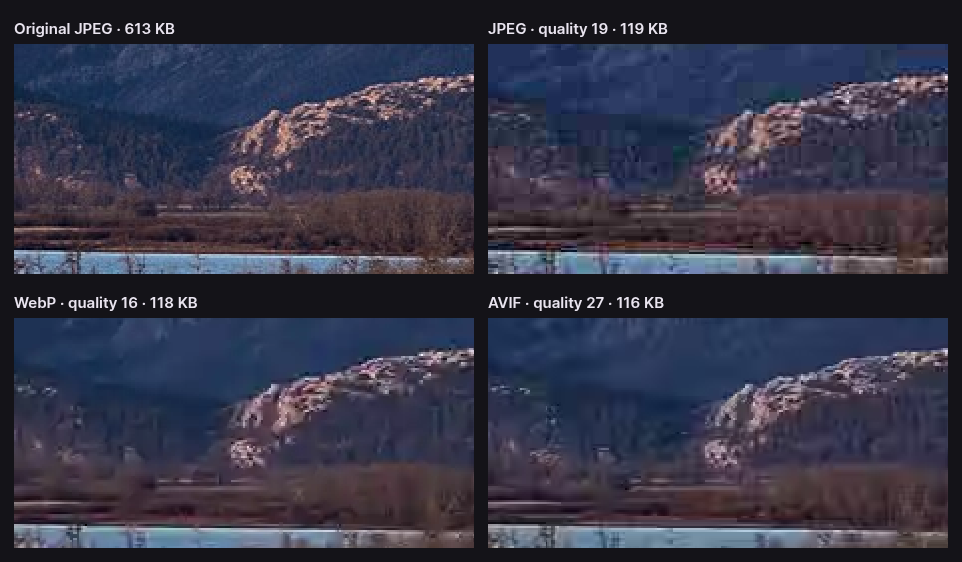
JPEG fails first and worst: its 8 × 8 blocks become visible squares, and the smooth mountainside turns into a patchwork. WebP hides its blocks better but wipes out texture, leaving the forest as flat smudges. AVIF gives up fine grain too, but it does so smoothly and keeps the edges that the eye actually reads — the ridge, the rocks, the shoreline. That is where its advantage lives: the tighter the budget, the wider the gap.
A conversion is a second compression
There is no lossless path from JPG to AVIF. The browser decodes your JPEG to pixels, and the encoder compresses those pixels again, making its own decisions about what to discard. What the first compression removed stays removed, and the second adds its own small losses on top. At sensible settings you will not see the difference, but it means a few habits are worth keeping:
- Start from the largest copy you have. The camera original, or an export from your photo editor, gives the encoder more to work with than a JPEG that has already been shrunk for a website or a messaging app.
- Resize in the same pass. If the AVIF is headed for a web page, switch on Resize and set the width it will be shown at. Fewer pixels save far more bytes than any quality setting.
- Convert once. Going JPG to AVIF and back to JPG, or saving an AVIF repeatedly, compounds the losses each time.
- Keep the JPEG. Converting drops the EXIF block, so camera settings, dates and GPS coordinates are not carried over. Welcome on a public page; a loss in an archive.
Drag the divider across the image to compare the conversion with your original before you download. If you can see the difference at 100% zoom, move the slider up five points.
Why AVIF takes longer than the other formats
Browsers can display AVIF, but none of them can yet write it: ask Chrome for an AVIF from a canvas and it quietly returns a PNG. So CropShrink carries its own encoder. It is libavif, compiled to WebAssembly and running in a background worker, which is why the page stays responsive while it works.
AVIF is built on the AV1 video codec, and its encoder searches hard for the cheapest way to describe each part of the image. That search is what makes the files small, and it is also why the photo in the table took about 1.7 seconds per encode on our test machine, where JPEG and WebP take a fraction of that. A 12-megapixel phone photo takes proportionally longer. If you also switch on Compress to a maximum file size, the editor tries about seven qualities in turn, so expect to wait several seconds.
Where AVIF works, and where to keep the JPG
Every current desktop and mobile browser displays AVIF: Chrome since version 85, Firefox since 93, Safari since 16 on iOS 16 and macOS Ventura, and Edge since 121. For images on a website that is effectively universal, and a <picture> element with an AVIF <source> and a JPEG fallback covers the rest.
Away from the browser, support is still thin. Many desktop viewers, office suites, email clients, print services and upload forms will not open an AVIF, or will refuse it outright. For any of those, a JPEG is the safer file — compress it as JPEG in the same editor instead of converting.
Questions about converting JPG to AVIF
Is AVIF better than JPG?
For the web, yes. At equal measured quality our sample photo was 406 KB as AVIF against 538 KB as a quality 80 JPEG, and at small sizes AVIF degrades far more gracefully. JPG still wins on compatibility: every program on every device opens it.
Does converting JPG to AVIF lose quality?
A little, because the photo is compressed a second time. At the default quality of 80 the difference is hard to see, and you can check it with the comparison divider before downloading. Convert from the best original you have, and convert only once.
Why is my AVIF bigger than the JPG?
The quality is set too high. Near 100 the encoder preserves the JPEG’s own compression artefacts in detail: our 613 KB sample became a 1,629 KB AVIF at quality 100, and a 349 KB one at 80. A JPEG that was already heavily compressed also has less left to save.
Is my photo uploaded to convert it?
No. The encoder is downloaded to your browser and runs there; the photo stays in your device’s memory from opening to saving. The privacy policy shows how to confirm it in your browser’s network panel.
More image tools
Every one of these is the same editor, opened for a different job — and all of them run on your device.
- Compress an imageShrink a photo for the web, an email or an upload form.
- AVIF vs JPGSize, speed and compatibility, measured, and when to use which.
- PNG to AVIFShrink screenshots and graphics, transparency intact.
- Resize an imageChange the pixel dimensions with Lanczos3, Catmull-Rom or Mitchell.
- Compress to 100 KBHit a hard upload limit without guessing at the quality slider.
- Remove EXIF dataStrip the GPS location, camera and serial number from a photo.
Or start from the full editor, which does all of it at once.