Lanczos3, Catmull-Rom, Mitchell: what a resize filter really does
Shrinking a photograph means deciding which detail survives. This is what that decision looks like, compared on the same image with the same code that runs when you resize here — including where the sharpest filter goes wrong.
The question nobody asks
Take a 1920-pixel-wide photograph and make it 640 pixels wide. Each pixel in the result has to stand for nine pixels in the original. Which nine, and in what proportion?
That question has more than one defensible answer, and the answer a program picks is the single biggest factor in whether a resized photo looks crisp or washed out. It is called the resampling filter, and most online image tools do not let you choose one — they hand the job to the browser and move on.
The cheapest answer is to keep one of the nine pixels and throw the other eight away. It is fast and it is wrong: the discarded pixels contained real detail, and dropping them turns fine texture into a shimmering mess. That failure is called aliasing, and it is why a naively shrunk photo of a brick wall or a striped shirt develops patterns that were never in the scene.
Every serious method instead takes a weighted average of a neighbourhood. The disagreements are about how wide that neighbourhood should be and how the weights should fall off.
What a filter actually is
A resampling kernel is a function: give it the distance from the point you are sampling to a source pixel, and it returns how much that pixel should count. Plot the three CropShrink offers and the differences are immediate.
Weight given to a source pixel by its distance, in output pixels, from the sample point. Plotted directly from the kernel functions in
app.js.Read it left to right. All three peak at the sample point and fall away, so nearby pixels count for more — no surprise. The interesting part is what happens below the zero line.
Lanczos3 is a sinc function windowed to a radius of three pixels. It dips to −0.147, meaning pixels at that distance are subtracted from the result. That sounds perverse and is exactly why it looks sharp: subtracting the neighbourhood around an edge exaggerates the contrast across it, which reads to the eye as detail.
Catmull-Rom is a cubic with a radius of two. Its negative lobe reaches −0.074, about half as deep.
Mitchell is the same cubic family tuned differently. It barely goes negative at all, bottoming out at −0.036, and it does not even reach 1.0 at the centre — it peaks near 0.89, spreading weight more evenly across neighbours.
Those three numbers predict everything you are about to see. Deeper negative lobe means sharper output and a greater risk of overshoot. Shallower means softer output and a cleaner one.
The same photograph, four ways
Here is a 1920 × 1280 photograph reduced to 640 × 427 — a three-times reduction — by each of the four methods in CropShrink. The crop is a patch of bare trees and water, magnified two times with nearest-neighbour so you are looking at real output pixels rather than a smoothed blow-up.
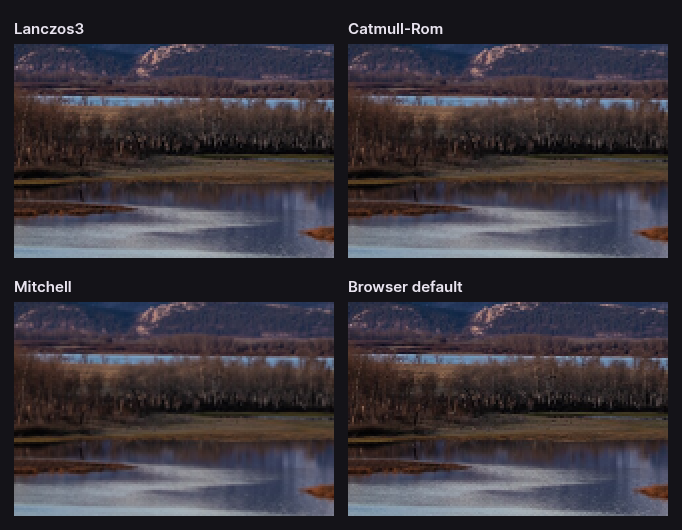
Lanczos3 and Catmull-Rom hold the individual trunks apart. Mitchell merges neighbouring branches into a haze. The browser default loses the most: what was a stand of distinguishable trees becomes a texture.
This is the honest case for choosing a filter. The browser result is not broken — for many purposes it is perfectly acceptable, and it is the fastest of the four. But it is throwing away detail that the other three keep at no cost in file size, and once it is gone no amount of sharpening puts it back.
Ringing: what sharpness costs
The negative lobe that makes Lanczos3 sharp has a side effect. At a very high-contrast boundary, subtracting the neighbourhood pushes pixels past the values either side of the edge — brighter than the bright side, darker than the dark side. The result is a faint halo tracking the edge, called ringing or overshoot.
A snow-covered ridge against a pale sky is close to the worst case. Same photograph, a four-times reduction this time:
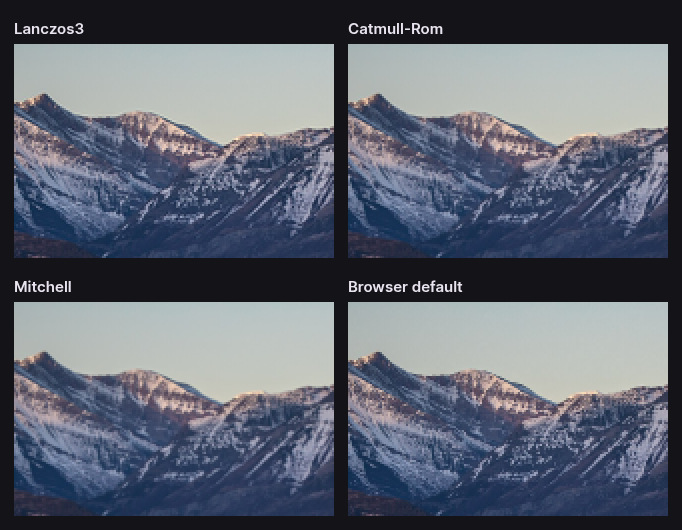
Look along the skyline. Lanczos3 carries a thin bright edge just above the rock and a thin dark one just below it. Catmull-Rom shows the same effect at roughly half the strength, which is what its shallower lobe predicts. Mitchell shows almost none — and pays for it in the softness you can see everywhere else in the frame.
Neither is a defect. They are the two ends of a trade nobody can escape: you cannot have maximum sharpness and zero overshoot from a linear filter. The reason CropShrink offers three is that the right point on that trade depends on the picture in front of you.
Two details that are easy to get wrong
Transparency has to be premultiplied first
A pixel that is fully transparent still stores a colour, and in most images that colour is black or undefined. Average a transparent black pixel with an opaque red one and you get a half-transparent dark red — a dirty fringe along every soft edge, most visible on logos and cut-outs placed on a light background.
The fix is to multiply each colour channel by its alpha before filtering, filter the premultiplied values, then divide back out afterwards. CropShrink does this, which is why the resampler works in a 16-bit intermediate buffer rather than straight bytes: premultiplied values need the extra precision to survive the round trip. It is a small thing that a surprising number of image tools skip, and it is visible the moment you resize a PNG with a feathered edge.
The kernel has to widen when you shrink
This is the bug that makes an otherwise correct implementation alias. A Lanczos3 kernel has a radius of three output pixels. If you are reducing four times, three output pixels span twelve input pixels — so a kernel that only looks three input pixels either side is sampling a quarter of the region it is supposed to be averaging, and skipping the rest. The result aliases exactly like nearest-neighbour, just more slowly.
The correct behaviour is to scale the kernel's support by the reduction factor whenever the output is smaller than the input, so every source pixel in the footprint contributes. In CropShrink that is the fs = Math.max(1, 1 / scale) term in the filter setup, and it is the difference between the comparisons above and a set of four images that all look equally bad.
Why this is fast enough to run in a browser tab
Done literally, filtering a 1920 × 1280 image with a radius-3 kernel means each output pixel averages a 7 × 7 patch — 49 multiply-adds per pixel per channel. For a large image that is billions of operations.
All three kernels are separable, which means the two-dimensional filter can be decomposed into two one-dimensional passes: filter every row, then filter every column of the result. The cost drops from 49 operations per pixel to 14. CropShrink also picks the cheaper order — whether to do horizontal or vertical first depends on which reduces the pixel count sooner — and runs the whole thing in a Web Worker so the interface stays responsive while it works.
That is the entire reason a browser tab can offer this at all. It is not a compromise implementation waiting for a server; it is the same algorithm a desktop image editor would use, arranged so that it fits in the time you are willing to wait.
Choosing, in practice
| Situation | Use | Because |
|---|---|---|
| A photograph, reduced for the web | Lanczos3 | Keeps the most detail; ringing rarely visible in natural scenes |
| Hard edges against flat colour — screenshots, charts, logos | Catmull-Rom | Most of the sharpness, much less overshoot |
| You can see halos on your image | Catmull-Rom, then Mitchell | Step down the sharpness until they stop |
| Grainy, noisy or high-ISO source | Mitchell | Sharpening noise makes it worse, not better |
| A very large image and you are in a hurry | Browser | Fastest; the quality gap costs you detail, not correctness |
| Enlarging rather than shrinking | Lanczos3 | Best apparent sharpness — but see below |
When in doubt, leave it on Lanczos3. It is the default because it is right more often than anything else, and the cases where it is not are the ones you can see.
Enlarging is a different problem
Everything above is about reduction, where the job is deciding what to discard. Enlargement is the opposite: the pixels you need were never recorded, and no interpolation filter can invent them. Doubling a 400-pixel image gives you an 800-pixel image containing 400 pixels of real detail and a great deal of confident guessing.
Filters still differ — Lanczos3 produces the crispest-looking enlargement — but they differ in how the guess is presented, not in how much truth it contains. If an enlarged image looks soft, no setting will fix it. The fix is a larger original.
Machine-learning upscalers are a genuinely different technique: they hallucinate plausible detail from a model rather than interpolating between known pixels. That can look remarkable and is emphatically not the same thing as recovering what was there. CropShrink does not do it, and will tell you the honest answer instead.
How these comparisons were made
Every crop on this page was produced by the same code that runs when you resize an image here. The script fetches app.js, extracts the resampler's worker source, and runs it over the sample photograph — so if the resampler changes, these images change with it, and they cannot quietly drift into being a description of something we used to do.
The source is a 1920 × 1280 photograph of Waterton Lakes National Park, a United States National Park Service image in the public domain. The comparison sheets are encoded as lossless WebP, so the artefacts you are looking at are the resampler's and not the page's. The generator is scripts/build-resampling-crops.mjs in the repository, and the kernel plot above is drawn from the same functions the filter uses.
You can check any of it yourself: open the resize tool, load a photograph of your own, and switch methods with the comparison divider open.
Put it to work
- Resize an imagePick a filter and a width, and watch the difference with the comparison divider.
- Compress an imageResizing first is almost always the bigger saving. Then trade quality for bytes.
- Crop an imageCrop before you resize: it removes the pixels rather than resampling them.
- PNG to WebPLossless at quality 100, and usually smaller than the PNG.