AVIF vs WebP: which to use, measured on the same images
WebP and AVIF are both modern web formats, both supported by every current browser, and both far better than JPEG. The differences between them are smaller than between either and JPEG — and, measured, they point in different directions depending on what kind of image it is.
The short answer: for photographs on the web, AVIF makes the smaller file, by 15–22% at the same quality. For anything that must stay pixel-exact, WebP wins clearly, because its lossless mode is far better than AVIF’s. WebP also encodes about 6 times faster and opens on older iPhones that AVIF does not.
Size, at the same quality
We saved two images as WebP at five settings and, for each, found the AVIF with the same structural similarity (SSIM) to the source — the same look, by a standard measure. One is our sample photograph, a 1920 × 1280 lakeside landscape; the other is a 1600 × 922 screenshot of this editor.
| WebP quality | Photo: WebP | Photo: AVIF | AVIF is |
|---|---|---|---|
| 50 | 253 KB | 220 KB | 13% smaller |
| 60 | 290 KB | 247 KB | 15% smaller |
| 70 | 326 KB | 271 KB | 17% smaller |
| 80 | 423 KB | 328 KB | 22% smaller |
| 90 | 649 KB | 469 KB | 28% smaller |
| WebP quality | Screenshot: WebP | Screenshot: AVIF | AVIF is |
|---|---|---|---|
| 50 | 94 KB | 81 KB | 14% smaller |
| 60 | 109 KB | 95 KB | 13% smaller |
| 70 | 124 KB | 108 KB | 13% smaller |
| 80 | 162 KB | 145 KB | 10% smaller |
| 90 | 247 KB | 224 KB | 9% smaller |
AVIF is smaller in every row, but not by the margins it has over JPEG. On the photograph the gap grows with quality, from 13% to 28%, because AVIF keeps fine texture more cheaply than WebP does. On the screenshot it is a steady 9–14%: flat colour and sharp edges are already easy for WebP.
At the tightest budgets the difference is easier to see than to measure. Here the whole photograph was squeezed to about 120 KB in each format — the WebP and AVIF crops are the two to compare:
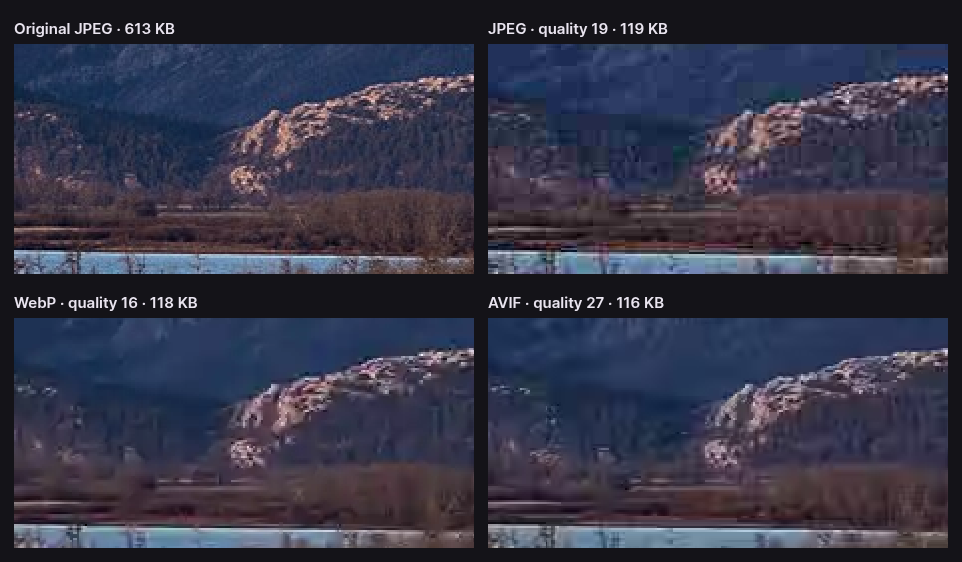
WebP, which descends from the VP8 video codec, flattens texture into smooth patches when bytes run short. AVIF, from the newer AV1 codec, has more tools for describing detail cheaply and holds on to edges longer.
Text and graphics: a draw
Lossy WebP always stores colour at half resolution, and CropShrink’s AVIF does the same, so both leave the same faint tint where white text sits on a saturated colour:
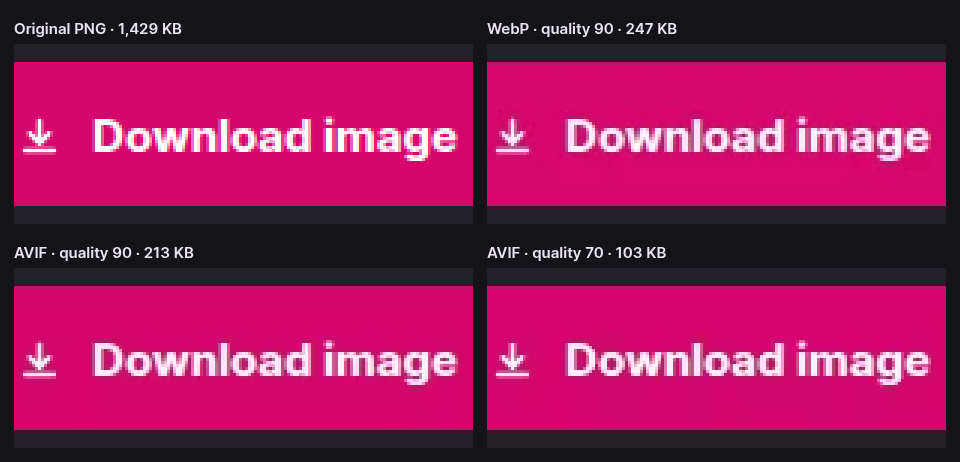
At normal viewing size neither shows it. The practical difference for screenshots is the 9–14% in the table above, and whether you need the pixels exact — which is the next section.
Lossless: WebP wins by a wide margin
Both formats have a lossless mode, for images whose pixels must survive exactly. They are not equally good at it. We encoded the same two images losslessly in each:
| Image | Lossless WebP | Lossless AVIF | AVIF is |
|---|---|---|---|
| Screenshot | 1,040 KB | 1,546 KB | 49% larger |
| Photo | 2,438 KB | 4,205 KB | 72% larger |
Lossless AVIF of the screenshot is even larger than the 1,429 KB PNG it came from. AVIF’s compression is built around approximating an image well; asked to reproduce one exactly, it has little advantage left. WebP’s lossless mode was designed as its own format, specifically to beat PNG, and it does.
That is why CropShrink exports lossless WebP, at quality 100, and does not offer lossless AVIF. For screenshots, UI captures and photos that must stay exact, use lossless WebP.
Simple drawn graphics are the exception. On two logos drawn from flat shapes and gradients, lossless AVIF was the smallest of all, and on the flattest one Chrome’s lossless WebP was even larger than the PNG; the AVIF vs PNG guide has those numbers. For a small logo, compare sizes before choosing.
Speed
We timed each format on the photograph at the editor’s default quality of 80, in Chrome, taking the median of several runs:
| Format | File size | Encode | Decode |
|---|---|---|---|
| WebP | 423 KB | 257 ms | 42 ms |
| AVIF | 349 KB | 1,534 ms | 47 ms |
AVIF took about 6 times as long to encode. For a web page that is paid once and forgotten; for converting thousands of images, or making them on the fly as a server does, it is a real cost. Decoding, which every visitor pays, is close: 5 milliseconds apart, while the AVIF is 74 KB smaller to download.
What each format can do
| WebP | AVIF | |
|---|---|---|
| Published | 2010, by Google | 2019, by the Alliance for Open Media |
| Built on | The VP8 video codec, plus a separate lossless format | The AV1 video codec |
| Lossy and lossless | Both | Both, though lossless is weak |
| Transparency | Yes | Yes |
| Colour depth | 8 bits per channel | 8, 10 or 12 bits per channel |
| HDR and wide colour | No | Yes |
| Colour resolution, lossy | Always half | Half or full |
| Animation | Yes | Yes |
| Largest image | 16,383 × 16,383 pixels | Larger, by tiling |
| Web browsers | Chrome 32+, Firefox 65+, Safari 14+, Edge 18+ | Chrome 85+, Firefox 93+, Safari 16+, Edge 121+ |
The browser rows are the practical difference. Every up-to-date browser shows both, but WebP arrived years earlier, so it also works on iPhones still on iOS 14 or 15, which AVIF does not. Outside browsers both are still patchy; JPEG and PNG remain the formats every program opens.
CropShrink exports 8-bit AVIF with half-resolution colour and exact transparency; it does not write HDR, lossless or animated AVIF.
When to prefer which
Choose AVIF for:
- Photographs on the web. 15–22% smaller than WebP at everyday settings, and more at high quality.
- Tight size budgets, where WebP turns texture to mush and AVIF stays presentable.
- HDR or wide-colour images, which WebP cannot store at all.
Choose WebP for:
- Lossless screenshots and photos that must stay exact. Lossless WebP was a third smaller than lossless AVIF on our screenshot. For small flat logos, check against the PNG.
- Speed: large batches, on-the-fly resizing, slow machines. It encoded about 6 times faster.
- Older Apple devices in your audience, on iOS 14 or 15.
- Screenshots, when the saving is small anyway: 9–14% may not be worth the slower encode.
Or serve both
On a website you do not have to pick. A <picture> element can list an AVIF <source>, then a WebP one, then a JPEG <img>; each browser downloads the first format it supports and nothing else. Current browsers get the AVIF, older iPhones the WebP, and anything else the JPEG.
Make each of those from your original, not from one another. Converting WebP to AVIF compresses the image twice; WebP to AVIF explains when it still pays, and where it backfires.
How we measured
Every number here comes from Chrome running the encoders CropShrink uses: the browser’s own WebP encoder, and libavif 1.0.1 compiled to WebAssembly at speed 7. The photograph is a public-domain image of Waterton Lakes National Park from the US National Park Service; the screenshot is our own. Similarity is luma SSIM over 8 × 8 blocks, and timings are medians on a four-core test machine, so yours will differ, though the proportions hold. Lossless AVIF is not something the editor offers, so it was measured straight from the same libavif build.
The scripts are in the repository: scripts/measure-avif.mjs for the equal-quality sizes, scripts/measure-to-avif.mjs for the lossless sizes and scripts/measure-speed.mjs for the timings. The AVIF vs JPG and AVIF vs PNG guides put the same measurements against the other two formats.
Questions about AVIF and WebP
Is AVIF better than WebP?
For lossy photographs, yes: 15–22% smaller at the same quality on our sample at everyday settings. For lossless images, no: lossless AVIF was 49% larger than lossless WebP on our screenshot. WebP also encodes about 6 times faster.
Is WebP obsolete now that AVIF exists?
No. It is the better lossless format, the faster one to encode, and the one older iPhones can open. Many sites serve AVIF with WebP as the fallback.
Which is better for transparent images?
Both keep transparency, and CropShrink stores it exactly in either. As lossy files, AVIF is usually smaller. If a logo must stay pixel-perfect, compare sizes: on our flat test logo the PNG beat lossless WebP.